
Betsson Casino Mobile gives players in the United Kingdom a convenient way to play casino games‚ manage payments‚ review activity and contact support from a smartphone or tablet. The mobile experience is designed for quick access‚ but responsible account management remains essential. Before registering‚ check that you meet the legal age requirement‚ understand the available controls and read the current Betsson terms for UK customers.
This guide explains how to manage a Betsson mobile account‚ including registration‚ verification‚ deposits‚ withdrawals‚ security‚ limits and responsible gambling tools. It is intended as a practical review of the account area rather than a promise of specific promotions or payment options‚ since these may change.
Registration and Personal Details
To open an account‚ visit the official Betsson website using your mobile browser or an approved Betsson gaming app. Select the registration option and enter accurate information‚ usually including your name‚ date of birth‚ address‚ email address and mobile number. UK operators must verify that customers are at least 18 and may need to confirm identity before allowing certain activities.
Using correct details is important. A mismatch between your profile and payment method can delay withdrawals or lead to additional verification. After registration‚ review the account settings and ensure that email notifications‚ contact details and preferred language are correct.
Identity Verification
Betsson may request documents such as a passport‚ driving licence or another accepted identity document. Proof of address may also be required‚ for example a recent bank statement or utility bill. Upload documents only through the secure account area or another official channel identified by Betsson support.
Images should be clear‚ complete and in date. Do not send sensitive documents through an unverified social-media account or to an unfamiliar email address. Verification times vary‚ particularly when documents require manual review.
Making Deposits on Mobile
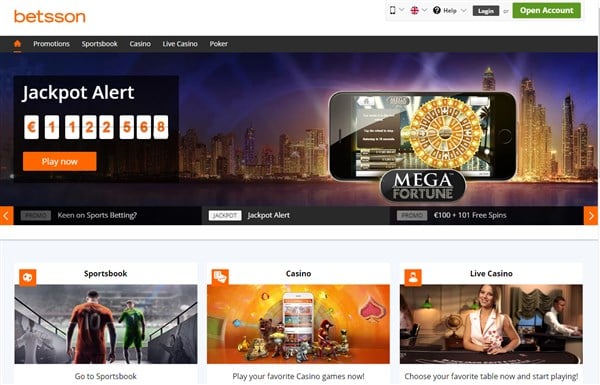
The cashier section is normally the starting point for adding funds. Open the account menu‚ choose the cashier or deposit option‚ select an available payment method and enter the amount. The exact selection may depend on your location‚ account status and current operator policies. Always check minimum and maximum amounts‚ processing times and any displayed terms before confirming.
For players looking for a simple balance top-up using Betsson gaming app‚ the process is usually straightforward: open the cashier‚ select deposit‚ choose a supported method‚ enter the amount and approve the transaction with the payment provider. The payment account should normally be in your own name. Depositing with another person’s card or wallet can create verification problems and may prevent a smooth withdrawal.
Before completing a transaction‚ confirm the currency‚ fees and final amount. A successful deposit should appear in the balance‚ but a bank or payment-provider authorisation does not always mean that the casino has received the funds. If money is deducted without appearing in the account‚ save the transaction reference and contact official support.
Deposit Limits and Safer Controls
UK players should review deposit-limit tools before playing. A limit can restrict the amount deposited over a selected period‚ helping keep spending predictable. Depending on the available controls‚ you may be able to set daily‚ weekly or monthly limits. Some changes may take effect immediately‚ while increases can involve a waiting period.
Do not treat a limit as a guarantee of profit or as a substitute for a personal budget. Decide what you can afford to lose before depositing‚ and never use essential household money‚ borrowed funds or credit intended for other expenses.
Withdrawals and Transaction History
To request a withdrawal‚ open the cashier and select the withdrawal section. Enter an amount within the displayed limits and choose an eligible destination. In many cases‚ Betsson will return funds to a payment method already used for deposits‚ although the available route depends on the account and current rules.
Withdrawal requests can be reviewed for identity‚ payment ownership‚ anti-fraud and safer-gambling reasons. This does not necessarily mean there is a problem‚ but the operator may ask for further information before releasing funds. Check the status page regularly and keep confirmation emails until the transaction is complete.
The transaction history is useful for checking deposits‚ withdrawals‚ bonuses and game activity. Reviewing it can reveal recurring spending patterns that are easy to miss when making small mobile payments. If a transaction looks unfamiliar‚ change your password and contact Betsson through the official support channel without delay.
Account Security on a Smartphone
Use a strong‚ unique password that is not shared with other websites. Enable any additional security feature offered in the account area‚ such as a verification code or two-step authentication. Avoid logging in through public Wi-Fi when handling payments‚ and never save login details on a shared device.
Always check the website address before entering credentials. Fraudulent messages may imitate casino branding and ask for passwords‚ payment details or document uploads. Betsson support should not require your password. If your phone is lost‚ change the account password from another trusted device and contact support if you suspect unauthorised access.
Game Access and Mobile Performance
Once the account is funded‚ the mobile lobby usually groups games by category‚ including slots‚ table games‚ live casino and other available titles. Use the search function to locate a particular game and check its information panel for rules‚ paylines‚ volatility or contribution details where provided.
Mobile play works best with a stable connection and an updated browser or application. If a game freezes‚ do not repeatedly press the play button. First check whether the balance or round history has updated‚ then refresh the page if appropriate. Screenshots‚ timestamps and the game name can help support investigate a disputed round.
Questions and Answers
How can I change my personal information?
Open the profile or account settings area and look for editable contact fields. Certain details‚ especially name or date of birth‚ may require support assistance and documentary evidence. Never create a second account to correct information‚ because duplicate accounts can breach the terms.
What should I do if I forget my password?
Use the official forgotten-password link on the login page. Follow the instructions sent to the registered email address or phone number. If the message does not arrive‚ check spam folders and confirm that you are using the registered contact details. Do not disclose recovery codes to anyone.
Can I use more than one Betsson account?
Players should generally maintain only one account unless Betsson explicitly states otherwise. A second account may be treated as a duplicate and can affect bonuses‚ verification and withdrawals. Contact support before opening another account if you cannot access the original one.
How do I close my account?
Contact official support or use the responsible-gambling section if a closure option is available. If you want a firm break‚ ask about self-exclusion rather than ordinary temporary closure. Withdraw any eligible balance first and avoid opening another account during the exclusion period.
Responsible Gambling Tools
Account management should include regular checks of time and spending. Betsson may provide reality checks‚ deposit limits‚ session reminders‚ temporary breaks and self-exclusion options. Select controls that match your needs before gambling becomes difficult to manage.
Warning signs can include chasing losses‚ hiding play from others‚ gambling longer than planned‚ borrowing money or feeling unable to stop. If any of these apply‚ stop playing and seek independent support. UK players can contact organisations such as GamCare‚ GambleAware or the National Gambling Helpline for confidential advice. In an emergency or crisis‚ contact the appropriate emergency service.
Support and Complaints
Use the help centre‚ live chat or contact form listed inside the official Betsson website. Provide your username or registered email‚ the relevant transaction or game reference‚ a clear description and any useful screenshots. Do not include your full password or unnecessary payment credentials.
If a problem is not resolved‚ follow Betsson’s formal complaints procedure and retain copies of correspondence. UK customers may have access to an alternative dispute-resolution process where applicable. Read the current terms to identify the correct escalation route and any time limits.
Final Assessment
Betsson Casino Mobile is built to make everyday account tasks accessible from a handheld device. Registration‚ verification‚ deposits‚ withdrawals‚ security settings and responsible-gambling controls can generally be handled without using a desktop computer. The most important habits are equally simple: provide truthful information‚ use payment methods in your own name‚ protect login details‚ monitor transaction history and set limits before playing.
Because payment options‚ verification requirements‚ game availability and promotional conditions can change‚ UK players should confirm the current information in their account and the official Betsson terms. A smooth mobile experience is useful‚ but careful control of the account remains the player’s responsibility.
